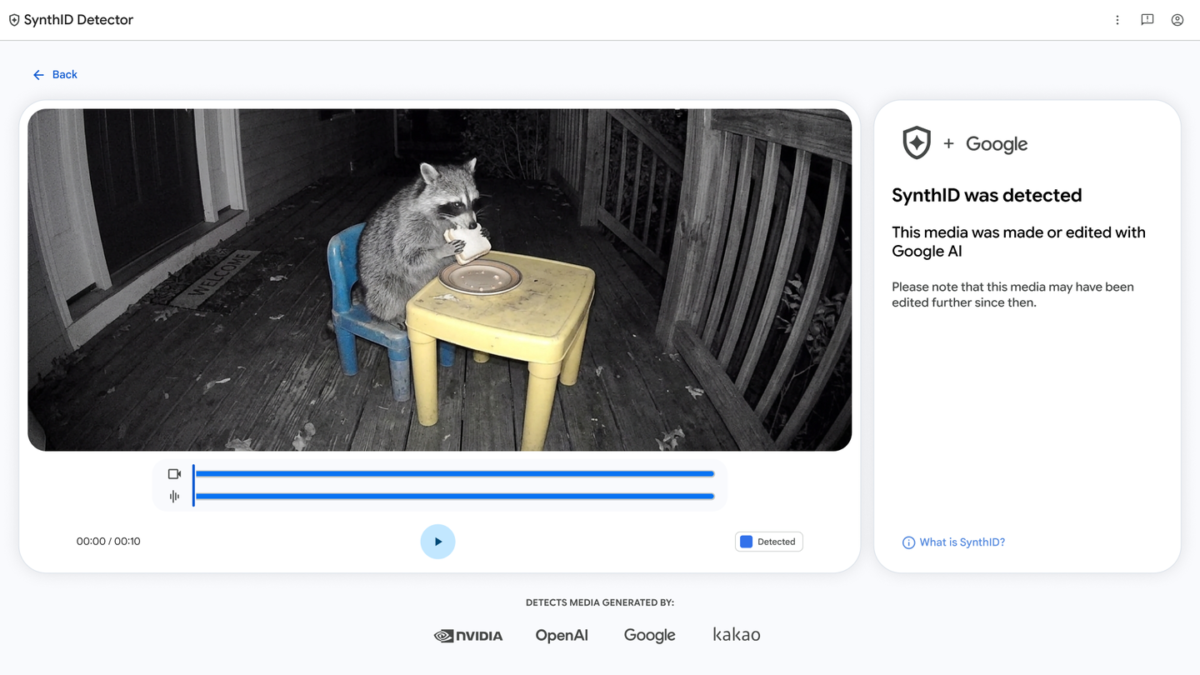
Anyone in Nigeria with a browser can now upload a photo, video or audio clip to Google’s SynthID Detector at synthid.com and check whether it carries a hidden AI watermark. Google opened the tool to the public worldwide, in English, on October 7, 2026, after keeping an early version for journalists, media professionals and researchers on a waitlist since May 2025.
That’s useful in a country where doctored images and fake voice notes move quickly through WhatsApp groups and Facebook pages, and where Meta recently removed 3.7 million scam-linked accounts across West Africa. The detector is free, but it only recognises content from certain AI tools, so you’ll want to understand what a result actually proves before you forward anything as confirmed fake or confirmed real.
| Available in Nigeria | Yes, worldwide in English since 7 October 2026 |
|---|---|
| Launch Price | Free |
| Where to use it | synthid.com, or the Gemini app |
| Files it checks | Images, video and audio |
| AI it can recognise | Google, plus partners OpenAI, NVIDIA and Kakao (Apple coming) |
| AI it can't recognise | Tools outside the SynthID network |
SynthID Detector looks for a signal you can’t see or hear
SynthID is a watermark that Google’s AI tools hide inside the pixels of images and video, and inside the sound of audio, at the moment the content is generated, rather than stamping a visible logo on it. Google DeepMind says the image and video watermark is “designed to stand up to modifications like cropping, adding filters, changing frame rates, or lossy compression”, and Google says it has watermarked more than 180 billion images and videos since SynthID launched in 2023.
Because the detector searches for that hidden signal rather than judging whether a picture “looks” AI-made, a positive result is strong evidence, although coverage is limited. Google DeepMind describes the detector as working with content made with Google AI and partner tools “including OpenAI, NVIDIA, Kakao, and soon, Apple.” Anything made with an AI app outside that group carries no SynthID watermark, so the tool has nothing to find.
Checking a suspicious file on synthid.com takes about a minute
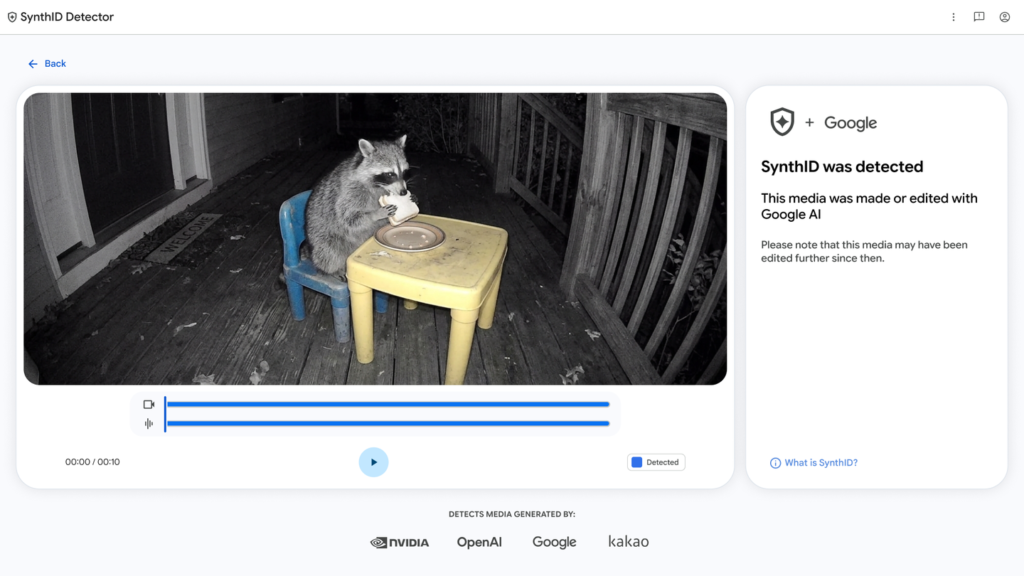
Open synthid.com in Chrome or any other browser, upload the image, video or audio file you want to test, and the tool will tell you if it finds a SynthID watermark. When it does, it can highlight the parts of the file most likely to carry it, which helps when only one face or one section of a clip has been changed.
Try to get the original file instead of a screenshot or a copy that’s been forwarded many times. Each repost compresses the media again, and while the watermark is built to survive normal edits, Google admits that after many alterations detection may fail. If all you have is a screenshot, Google’s own guidance is to crop it tightly around the picture and not to upload a collage of several images.
On your phone, Gemini can run the same check
If you already use Gemini, you don’t need the website. Open the Gemini app or gemini.google.com, sign in with your Google account, tap the Add files button and choose Upload Files (or pick from Google Photos or Drive). Then ask something like “Is this AI-generated?” or “Was this image created or edited by Google AI?” and Gemini will check for the watermark and explain what it found. Our report on Gemini 4 Argon in Nigeria covers which Gemini plans are available here.
Google’s Gemini help page limits you to one file at a time, up to 100MB, with videos under 90 seconds and audio under an hour. The quota is roughly 10 image checks, 10 video checks and 10 audio checks in any rolling 24-hour period, which is plenty for checking the odd viral post but not for bulk fact-checking. On the web and in the Android app, Gemini can also read Content Credentials, the edit history some cameras and apps attach to files, though iPhone support for that part is still on the way.
| Problem | Likely cause | Fix |
|---|---|---|
| Watermark detected | All or part of the file was made or edited with Google AI, or with a partner tool the detector covers | Treat it as AI-made or AI-edited, and look at which part was flagged before you share it |
| No watermark found | Google AI and its partners didn't make it, but a different AI tool still could have | Don't call it real yet. Run a reverse image search and look for garbled text or odd hands |
| Result is unclear | There may not be enough detail to read, or the AI edit was too small | Find a sharper copy, ideally the original file, and check again |
| Watermark found in part of a video | Only those segments carried the signal | Detection in a segment doesn't mean every frame in it is AI, so watch that section closely |
A clean result doesn’t make a WhatsApp forward true
Google’s help page says a “not detected” result means Google AI didn’t create or edit the file, “but other AI systems may have.” Plenty of AI image, video and voice apps sit outside the SynthID network, so a fake made with one of them will pass the detector cleanly. Google itself suggests backing up any check with a reverse image search, a look at the file’s metadata where you have the original, and a close look for visual giveaways such as warped text or strange fingers.
For anything involving money, such as a video of a well-known person promoting an investment app or a voice note claiming to be from your bank, the detector should never be the deciding test. Go to the verified page or official website of the person or organisation named, and call your bank on the number printed on your card before you transfer anything.
Where SynthID fits in your fact-checking habits
Think of SynthID Detector as a one-way test. When it finds a watermark, you can be fairly confident AI was involved, and that alone is enough to stop a fake from spreading through your family group. When it finds nothing, you’ve only ruled out Google and a handful of partners, so keep checking the source. Bookmark synthid.com on your phone, save your free checks for the posts that actually worry you, and let the official account of whoever is quoted have the final word.