

Like most Android users, I’ve always stuck to Google Play Store for downloading apps. It’s what comes pre-installed, it’s familiar, and frankly, I never had a reason to look elsewhere. But recently, I decided to give Palm Store a real shot, and I have to admit that I’m impressed by what I found.
What Exactly Is Palm Store?
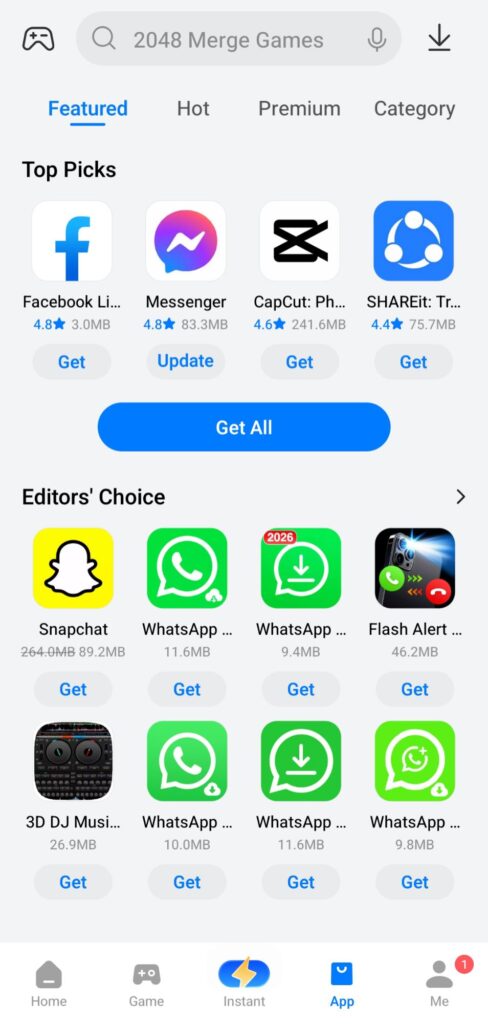
Palm Store is an independent Android app marketplace designed specifically for users across Africa, though it’s available to anyone willing to sideload it. It comes preinstalled on TECNO, Infinix, and itel smartphones, which are manufactured by Transsion Holdings.
If you own one of these budget-friendly phones (and millions of people do, especially in Africa, India, and Southeast Asia), you’ve probably noticed Palm Store sitting right there on your device alongside Google Play. I used to ignore it completely, thinking it was just another bloatware app taking up space. Boy, was I wrong.
Why I Finally Gave It a Try
My curiosity got the better of me when I started running low on mobile data. I’d heard that some alternative app stores compress files to save bandwidth, and that caught my attention. Palm Store uses package compression technology that reduces data usage by over 30 percent, which is a huge deal when you’re trying to conserve data or dealing with slow internet speeds.
I figured, what’s the harm in checking it out? At worst, I’d delete it and go back to my usual routine.

My First Impressions: Clean and Straightforward
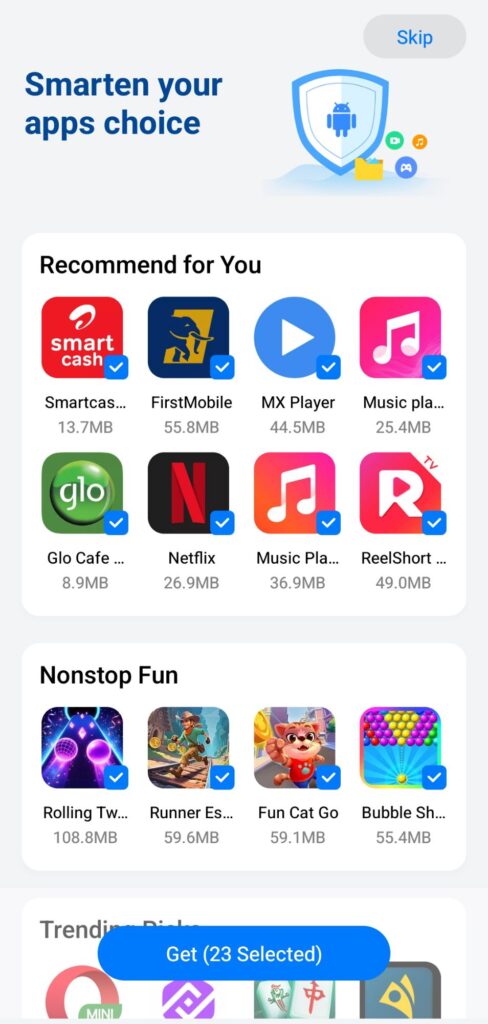
Opening Palm Store for the first time, I was pleasantly surprised by how clean the interface looked. It’s not trying to overwhelm you with flashy graphics or complicated menus. The main screen is divided into simple sections: Home, Games, Apps, and Fun.
Everything is laid out in a way that makes sense. Featured apps sit at the top, followed by “Hot” and “New” categories so you can see what’s trending and what’s just been added. The store hosts thousands of Android apps covering gaming, lifestyle, education, entertainment, and utilities.
The search function works well too. Type in what you’re looking for, and relevant results pop up quickly.

What I Actually Found Inside
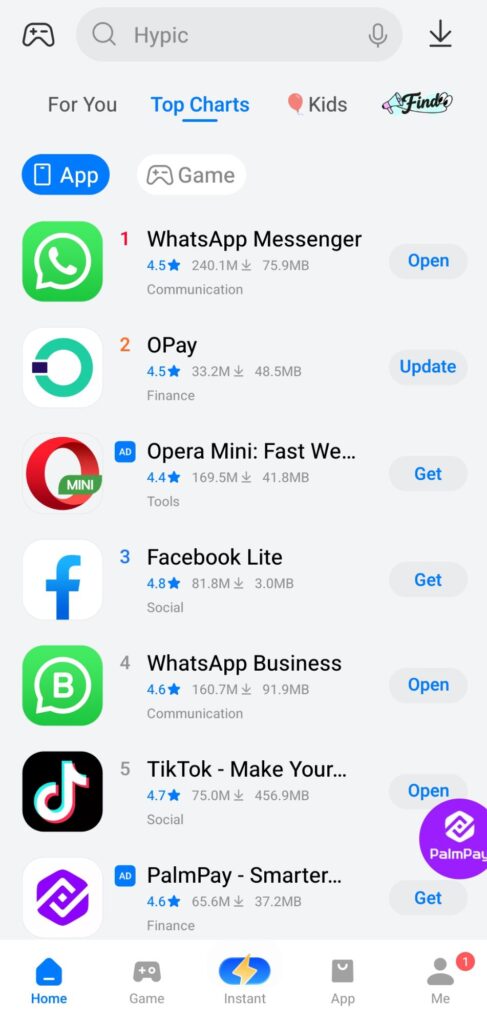
Here’s where Palm Store really won me over. The app selection is way better than I expected. Sure, you’ll find all the big-name apps like WhatsApp, TikTok, Instagram, and Facebook, but there’s also a solid collection of regional apps that are harder to find on Google Play.
Palm Store focuses on apps that match African lifestyles, trends, and entertainment, giving it a more localized feel. Even if you’re not in Africa, this means you get access to apps and games that might be region-locked or unavailable in your country’s Play Store.
I discovered productivity tools, local music streaming services, and mobile banking apps I’d never seen before. For someone who loves exploring new apps, this was like finding a hidden treasure chest.
The Download Experience
I won’t sugarcoat this, the download speeds can be slower compared to Google Play. The download speed on Palm Store is quite slow, so patience is required when downloading larger games or apps that exceed 1 GB. This was noticeable when I tried grabbing a 500 MB game. It took a bit longer than I’m used to, but honestly, the data savings made up for it.
Once an app finishes downloading, installation is smooth and straightforward. You’ll get the standard Android prompts asking for permissions, just like any other app store.
No Account Required (Yes, Really)
One of my favorite features for sure, You don’t need to sign up or log in to download apps from Palm Store. This is huge for privacy-conscious users or anyone who’s tired of creating yet another account just to download a free app.

You can browse, search, and download to your heart’s content without handing over your email address or personal information and It’s very refreshing.
Built-in Performance Tools
This was an unexpected bonus. Palm Store includes some handy device optimization features that I didn’t expect from an app store. It offers a Boost tool that closes open apps to free up RAM, and a Junk File Cleaner that deletes unnecessary files to reclaim storage.
Are these features groundbreaking? Not really because my phone already has similar tools built into the system, But having them right there in the app store is convenient when I’m in the middle of downloading something and realize I need to clear some space first.
Safety and Security: The Honest Truth
Let’s talk about the elephant in the room, is Palm Store safe? Palm Store performs virus and malware checks before listing any app, and the team ensures users always get the latest and safest versions available.
That said, the app doesn’t provide an additional verification layer beyond Android’s standard security process, so users should review permissions and version details carefully before downloading. In other words, practice the same caution you would with any app from any source.
I personally haven’t experienced any security issues, but I do make it a habit to check app permissions before installing anything, whether it’s from Google Play, Palm Store, or anywhere else.
Extra Features That Surprised Me
Beyond just being an app store, Palm Store throws in some entertaining extras. Like;
1. A built-in video player featuring music hits and trending videos. It’s nothing fancy, but it’s nice to have if you’re killing time.
2. A collection of online games you can play without downloading, which is useful for quick entertainment without adding new apps to storage.
3. An ebook section where you can browse and read digital books.
These aren’t features I use every day, but they add value and make Palm Store feel like more than just a stripped-down app marketplace.
The Local Focus Makes a Difference
What sets Palm Store apart from giants like Google Play is its deliberate focus on emerging markets. The storefront runs in nine languages and is designed for low-friction installs on budget to mid-range devices.
This isn’t an app store trying to be everything to everyone worldwide. It knows its audience and serves them well. That focus translates into an app selection that actually makes sense for the regions it targets, rather than just copying whatever’s popular in Silicon Valley.
What About Updates?
App updates work exactly how you’d expect. Apps on Palm Store are updated frequently, so you don’t have to worry about using outdated versions or missing new features. When an update is available, you’ll see a notification in the app’s update section, and you can choose to install it whenever you want.
The manual update approach gives you more control compared to Google Play’s aggressive auto-updates that can happen at the worst possible times.
The Data Compression Really Works
I mentioned this earlier, but it’s worth emphasizing because it’s genuinely useful. Palm Store’s package compression reduces file sizes by over 30 percent, which means you’re using significantly less mobile data for every app you download.
In practical terms, an app that would normally consume 100 MB from Google Play might only use 70 MB from Palm Store. Over time, especially if you download apps frequently, those savings add up.
If you’re on a limited data plan or live somewhere with expensive mobile data, this feature alone makes Palm Store worth considering.
Who Should Try Palm Store?
Based on my experience, Palm Store is particularly well-suited for:
People who want to conserve mobile data and don’t mind slightly slower download speeds.
Anyone curious about discovering apps from different regions that might not be available in their local Google Play Store.
Users with TECNO, Infinix, or itel phones who already have it pre-installed and just haven’t explored it yet.
Privacy-focused individuals who prefer not to create yet another account just to download apps.
Budget-conscious users who appreciate built-in tools for device optimization.
Limitations to Keep in Mind
To be fair, Palm Store isn’t perfect. Here are some drawbacks I noticed:
Download speeds are slower than Google Play, especially for larger files.
The app selection, while solid, isn’t as massive as Google Play’s 1.68 million apps.
Some users might prefer the additional security layers and developer verification that Google Play offers.
Android protection systems may sometimes flag Palm Store APK installations as coming from unknown sources, which requires you to manually allow installations.
Is Palm Store Worth Using?
Here’s my honest take after spending time with it: Palm Store is a surprisingly solid alternative app store that serves a specific purpose really well.
It’s not going to replace Google Play for most people, and it doesn’t need to. What it does offer is a legitimate second option for downloading apps, particularly if you care about data savings, want access to region-specific apps, or simply appreciate the no-account-required approach.
The interface is clean, the app selection is better than expected, and the built-in features add genuine value. Yes, the download speeds could be faster, but the compression technology more than makes up for it if you’re watching your data usage.
My Recommendation
If you already have Palm Store on your phone, don’t dismiss it as bloatware. Take ten minutes to explore what’s inside. You might find apps you’ve been looking for or discover something new that’s perfectly suited to your needs.
If you don’t have it pre-installed, you can download the Palm Store APK from trusted sources like APKMirror or Uptodown. Just remember to enable “Install from Unknown Sources” in your Android settings first.
Give it a fair shot. You might be as pleasantly surprised as I was. At the very least, it’s nice to have options beyond the usual Google Play routine, and Palm Store proves that alternative app stores can deliver real value when they’re built with intention and focus.
Final Thoughts
The world of Android app stores doesn’t have to begin and end with Google Play. Palm Store showed me that alternative marketplaces can offer meaningful benefits, whether that’s data savings, regional app access, or just a different browsing experience.
Is it perfect? No. But it’s genuinely good at what it does, and sometimes that’s all you need. If you’ve been curious about trying something different, Palm Store is worth your time. I went in skeptical and came out impressed and that says a lot.
So yeah, I gave Palm Store a chance, and it turned out to be surprisingly good. Your experience might vary, but there’s only one way to find out. Download it, explore it, and see what you discover. You might just find your new go-to app store for certain downloads.
Don’t want to miss the best from TechSocial?
- Set us as a favorite source in Google Discover to see our latest updates first.
- You can also add us as a preferred source in Google Search by clicking the button below.