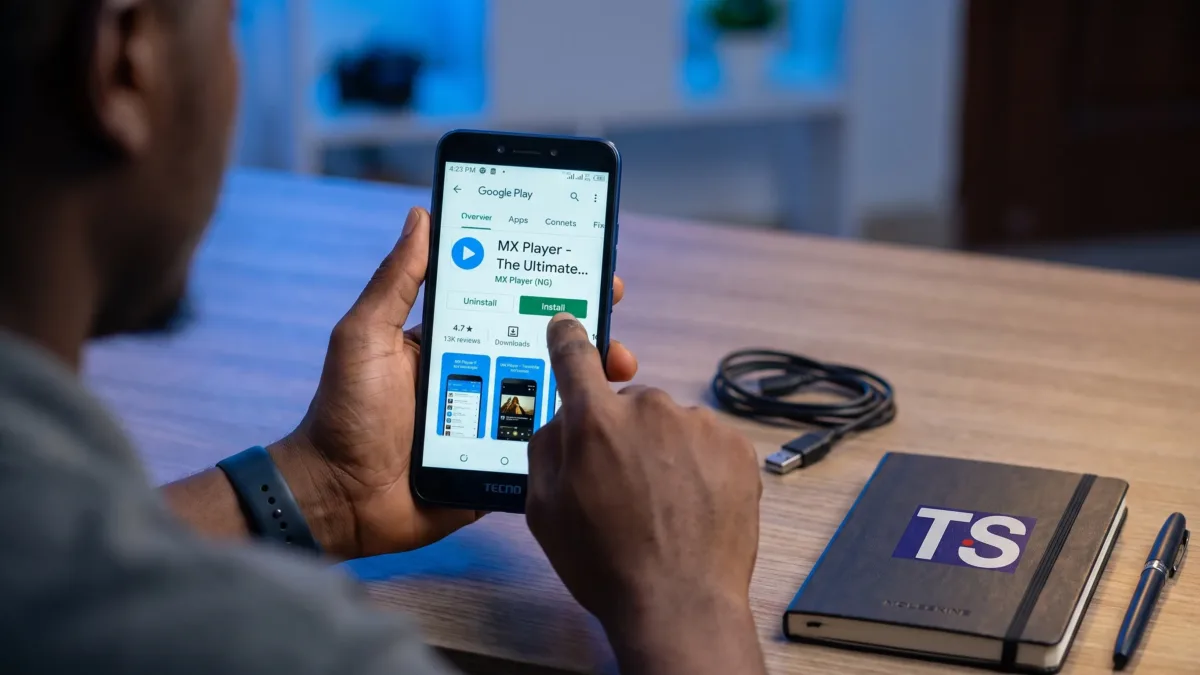
MX Player’s Android app has a Google Play listing identified by the package com.mxtech.videoplayer.ad. For a safe mx player download, start with that listing instead of an APK file shared through a message, advert or download page. You can follow the Play Store installation steps below on Tecno, Infinix and itel phones without enabling installation from unknown sources. Once it’s installed, check its permissions before opening your saved videos.
Check the official listing, not just the icon
Open MX Player’s Google Play listing on your phone. If your browser opens the page first, follow its option to continue in the Play Store app.
The package identifier appears after id= in the linked address. It identifies this particular Play Store listing, which is more useful than recognising an icon or searching for a familiar-looking name. App names, artwork and publisher branding can change, so compare search results against the linked listing rather than relying on those details alone.
Check the app title, publisher information and description together. Reviews can help you understand other users’ experiences, but a high rating isn’t proof that an unrelated app is the one you intended to install.
If you want to watch videos already saved on your phone, you’re looking for local video playback. Online entertainment sections are a separate consideration, and their availability can depend on your country and app version. Installing the player doesn’t guarantee access to a particular streaming catalogue in Nigeria.
Complete your mx player download in Google Play
Use the Play Store itself to download and install the app. You don’t need to visit another page to collect an installer, unlock a download button or install a separate download manager.
- Open the linked MX Player listing in the Google Play Store app and confirm you’re viewing the intended app.
- Tap Install. If you see Open instead, the app is already installed; Update means an update is available.
- If Google Play asks which connection to use, choose according to your data allowance. A trusted Wi-Fi connection can help you avoid spending mobile data on the installation.
- Leave the download running until installation finishes. Don’t download a second installer because the first progress indicator appears slow.
- Tap Open, then review any permission requests before accepting them.
The download size shown by Google Play is more useful than a size quoted elsewhere because the files delivered can depend on your device and the current release. You’ll also need free storage for installation, not just enough space for the displayed download.
If the Play Store is missing or disabled, restore it before looking for an MX Player APK. Our guide to installing or restoring Google Play Store safely explains how to check what’s already on your phone without installing an unverified replacement.
Allow video access without granting unrelated permissions
After your mx player download finishes, the first permission request may concern the videos stored on your phone. That’s relevant to a player that needs to find and open local media, but it doesn’t mean every permission request should be accepted automatically.
Read the request itself. Access to videos or media files serves a different purpose from access to contacts, SMS messages or accessibility controls. Simply playing a saved video doesn’t require you to share a banking OTP, enter your card PIN or give another person remote access to your phone.
You can review permissions later by touching and holding the app icon, opening App info and selecting Permissions, where your launcher supports that shortcut. Google’s Android permission instructions explain how to review and change access through your phone’s settings as well.
Match the permission wording to your Android version
On a TECNO Spark 10 Pro running HiOS 12.6 and Android 13, media permissions may refer to Photos and videos. Older Android versions can use wording such as Storage or Files and media. An updated phone may show different choices, so don’t assume that instructions for its original software still match what’s on screen.
Some newer Android versions also offer access to selected photos and videos. If you choose limited access, a player may only see the items you approved. A missing video can therefore be a permission issue rather than a failed installation.
For your mx player download, start with only the access needed to play your files. If the app can’t find a particular video, check its permission and the file’s location before granting broader access. A video inside another app’s private storage may not appear in the player’s library at all.
Keep Play Protect on when a download page asks otherwise
Google Play Protect checks apps for potentially harmful behaviour. You can review it through Google Play Store > profile picture > Play Protect. Its settings include Scan apps with Play Protect, which should remain enabled.
Google’s Play Protect documentation explains what those checks do. They provide a useful layer of protection, but they aren’t a guarantee that every app or file is harmless. You still need to check where the installer came from and what access it requests.
Don’t disable Play Protect or grant accessibility access just to install a video player. If a page insists that these changes are necessary, close it and return to the linked Play Store listing.
An APK is an Android installation file, not automatically a malicious file. The problem is trusting an installer whose origin and contents you can’t establish. A page promising a modified, unlocked or unusually small version doesn’t prove that its file came from the app’s publisher.
If your mx player download redirects you to an APK page, you don’t have to continue. Delete an installer you haven’t opened through your file manager and don’t enable Install unknown apps for the browser. If Google Play says the app is unavailable or incompatible, an older APK may not solve the underlying restriction safely.
Fix a stalled installation before looking for another installer
A download that stays on Pending often needs a connection or queue check, not a different source. Open Manage apps & device from your Play Store profile menu and check whether other downloads or updates are running. Pause anything you don’t need immediately, then return to the MX Player listing.
Check that your connection can load another page and that your phone has free storage. If you’re using mobile data, look for a Play Store download preference that’s waiting for Wi-Fi. You can change that preference if you’re comfortable using your data allowance, but don’t keep restarting the download without checking its status.
Restarting the phone is a reasonable next step if the queue remains stuck. Google’s download troubleshooting instructions cover checks for connection problems, storage and other Play Store issues.
Treat compatibility messages differently from connection problems
If your mx player download fails because Google Play says the app isn’t compatible with your device, repeatedly changing networks won’t fix that message. Check the compatibility information on the listing and whether your phone has a legitimate system update available through its built-in updater.
Don’t install firmware intended for another model or use a modified APK as a shortcut. If the listing says the app isn’t available in your country, don’t assume that changing account settings will safely resolve it either. Google Play availability and device compatibility are separate from the quality of your MTN, Airtel, Glo or T2 connection.
Test a saved video before changing more settings
Once installation is complete, try a short video recorded with your phone’s camera. This gives you a straightforward local file to test, rather than a download that could be incomplete, protected or stored inside another app.
If the video appears and plays with sound, you’ve confirmed that the app can access at least that file and handle its format. To test offline playback, temporarily switch off Mobile data and Wi-Fi, then replay the same saved video. Local playback shouldn’t require you to stream that file again, although online sections and adverts may still try to connect.
If one downloaded video won’t play, check that its download finished and that the file still exists in your file manager. A successful mx player download won’t repair a damaged video or remove restrictions from protected content.
Avoid downloading a supposed codec pack from an advert or message just because a file has no sound. If the player offers HW and SW decoder options, you can try another built-in option for that file. Software decoding may use more battery, so return to the previous option if it doesn’t help or makes the phone noticeably warmer.
Keep future updates on the same verified route
For later updates, return to the same Play Store listing or use Manage apps & device. You don’t need an APK sent through WhatsApp or a browser pop-up claiming that your player has expired.
Start with the verified MX Player listing, install through Google Play and test a video you already own. If something fails, use the specific error or permission request to choose your next step rather than replacing the app with an unfamiliar installer.