WhatsApp behaves differently from almost every other app on your phone, and that difference is the whole reason it shows up at the top of your battery chart. Most apps sit quietly until Google’s push service pokes them awake. WhatsApp holds its own live connection to its servers so messages arrive the instant they are sent, which is exactly what you want from it and exactly what costs power. Google’s own Android performance documentation explains how background activity keeps a phone out of the deep sleep states where most battery is saved.
That matters because the advice floating around for this problem tends to attack the connection itself, and a WhatsApp that cannot hold its connection is a WhatsApp that does not tell you about messages until you open it. There is a real fix here, and it is narrower than “restrict everything”. We’ll go through why the drain happens, which setting is safe, which two are actively counterproductive, and how to tell when the app is not the culprit at all.
Wakelocks are the actual cost, not the app sitting in memory
Every incoming message, group notification, missed call and sync forces part of your processor and radio to switch on for a moment. One of those is nothing. A few hundred a day, which is ordinary for anyone in half a dozen active Nigerian group chats, adds up to a phone that never gets a proper stretch of idle time. Think of it as someone knocking on your door every four minutes: no single knock is tiring, but you never quite get to sleep. This is why the drain feels worst on days when you were barely using the app, since it is the incoming traffic doing it rather than your own screen time.
Media is the second half of the problem, and in Nigeria it is a big half. WhatsApp downloads and processes photos, videos and voice notes in the background, generates thumbnails for them, and prepares backup data on a schedule. Group chats full of forwarded videos and status posts mean a lot of that work happening whether or not you ever open the media. On an older or entry-level phone with a slower chip, that processing takes longer, which means the processor stays awake longer for the same amount of content.
Setting WhatsApp to Restricted is the advice that breaks your notifications
Android gives you three battery settings per app: Unrestricted, Optimised and Restricted. Optimised is the default and is the one you want, since it lets Android manage WhatsApp intelligently, batching its background work and easing off when the phone is idle. Restricted is a different thing entirely. It cuts the app’s ability to run background jobs at all, and on a messaging app the practical result is late notifications or no notifications until you open it yourself. Samsung’s deep sleeping apps list does the same thing under a different name, and Samsung’s own moderators confirm that apps in it never run in the background and receive no updates.
So the safe version of this fix is a check rather than a change. Go to Settings > Apps > WhatsApp > Battery (called App battery usage on some phones) and make sure it reads Optimised. If someone previously set it to Unrestricted, moving it back to Optimised is a genuine improvement. If it is already on Restricted, that may be the reason your messages have been arriving in clumps, and moving it up to Optimised will fix that. On Samsung, also check Settings > Battery > Background usage limits and take WhatsApp out of both the sleeping and deep sleeping lists if it has landed there.
Turning off background data for WhatsApp is the other piece of advice worth ignoring, for the same reason. That setting is what allows the app to maintain its connection while you are on mobile data, so switching it off means messages queue up and land in a batch the moment you open the app. Plenty of Nigerians are on mobile data almost all the time, which makes this less of a battery tweak and more of a way to miss things. If data cost rather than battery is what is bothering you, our guide to apps that help you save data in Nigeria tackles that directly.
The settings that actually cut the drain sit inside WhatsApp, not in Android
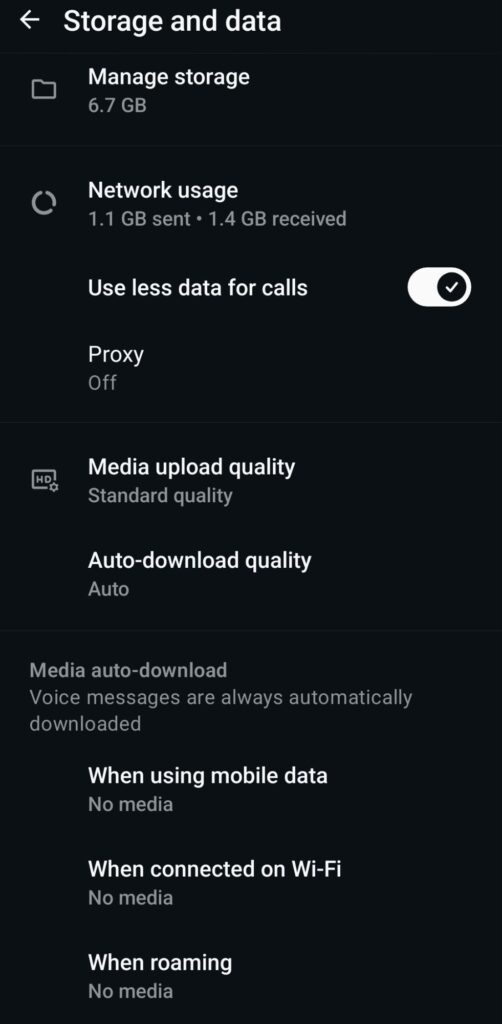
Auto-download is the single most effective change available to you, and most people have never touched it. Open WhatsApp, tap the three dots, then Settings > Storage and data, and under Media auto-download set both mobile data and Wi-Fi to No media, or to photos only if you would rather keep those. Every video and voice note that no longer downloads by itself is processing your phone no longer has to do, and the change is immediate rather than gradual. You can still tap any individual item to download it when you actually want it.
A few smaller ones are worth doing in the same sitting. Mute the groups you never read, since a muted chat stops generating notification wakeups even though the messages still arrive. Turn off Settings > Chats > Media visibility so your gallery stops indexing every forwarded image. Move your Google Drive backup from daily to weekly under Settings > Chats > Chat backup, and switch on the Use less data for calls option under Storage and data if you make WhatsApp calls often. None of these individually transforms anything, but together they remove a meaningful share of the work the app was doing on your behalf.
Keeping the app updated matters more than it sounds, too. Battery drain bugs are a real category of WhatsApp bug and several have been fixed in past releases, so an outdated version leaves you fighting a problem someone else already solved. While you are in there, it is worth turning off the setting that keeps WhatsApp permanently connected across a laptop, since linked devices maintain their own sync activity that you may not be using.
When WhatsApp is being blamed for something else entirely
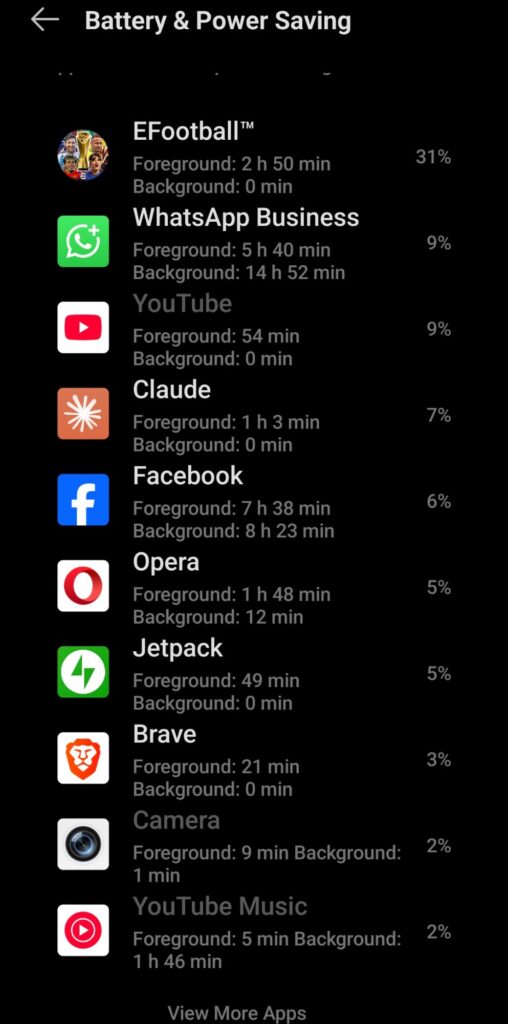
Battery charts are misleading in one specific way: the app you use most will always appear near the top, because screen time counts against it. If WhatsApp shows heavy foreground usage and light background usage, the drain is your screen rather than the app, and nothing you change inside WhatsApp will move it. Tap into the battery usage entry and check how the two are split before assuming anything. Aggressive third-party battery savers are another false lead, because repeatedly killing and restarting WhatsApp costs more power than letting it run in a controlled state.
Timing is the other clue. If the drain started right after a system update rather than building up gradually, WhatsApp is probably not the cause at all, and we covered that pattern in what happens when your phone battery gets worse after an update. A phone that also runs hot points elsewhere again, which is the subject of why Android phones start heating up after updates. And if the battery empties quickly no matter which apps you use, the cell itself may simply be aged, in which case a phone that charges fast but drains quickly is the more useful read.
Once auto-download is off and the battery setting is on Optimised, most people see the difference within a day of normal use: the phone runs cooler in the pocket, standby holds up overnight, and WhatsApp drops down the battery chart without going quiet. It will never be a low-power app, because holding a live connection is precisely what makes messages arrive the moment someone sends them, and that is a trade most people would take. The aim is to stop it doing work you never asked for, not to switch off the part you actually use it for.