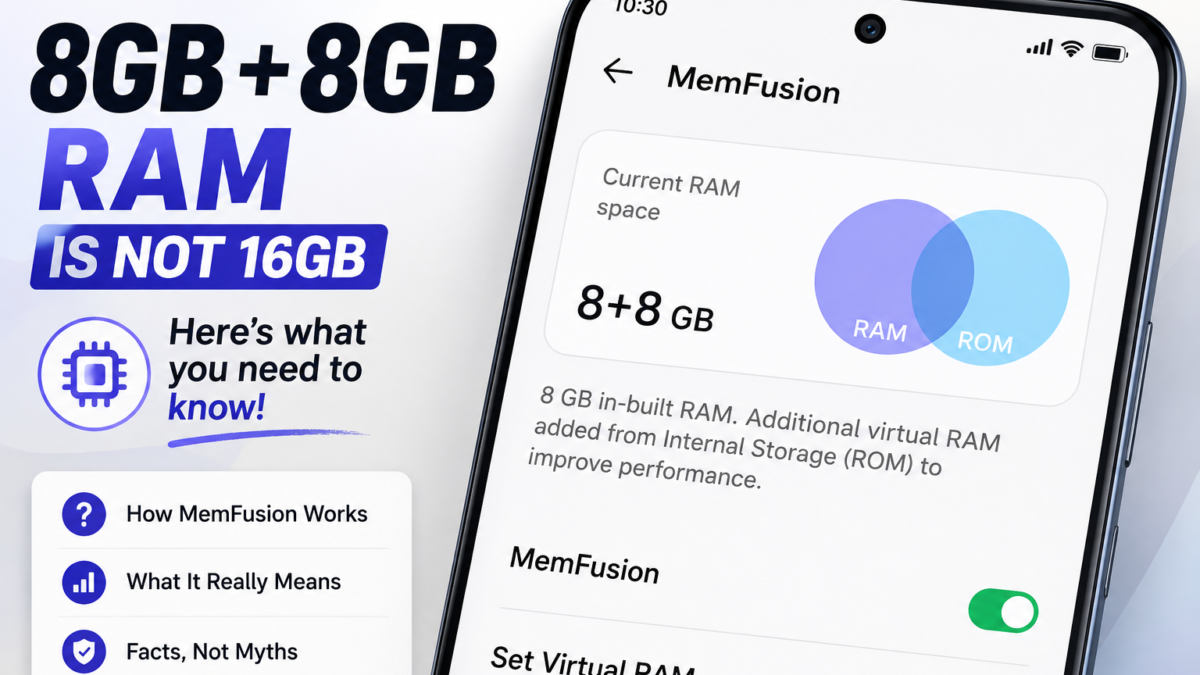
When Tecno launched the Pova 5 Pro, the marketing said 16GB RAM. The fine print said 8GB physical RAM plus 8GB extended RAM, which is a very different phone. Walk through any shop in Computer Village today and you’ll see the same arithmetic on stickers and shelf cards, usually written as 8+8 or 6+6, and usually explained by whoever is selling it as though the two numbers mean the same thing.
They don’t. The second number is a feature Transsion calls MemFusion on Infinix and Memory Fusion on Tecno, and it isn’t memory at all. It’s a slice of your storage doing an impression of memory, and understanding the difference is worth real money right now, because RAM prices have climbed sharply through 2026 and manufacturers have leaned much harder on virtual RAM marketing to make cheaper configurations look generous.
What your phone is actually doing when it claims extra RAM
Your phone has two kinds of memory. RAM holds whatever is running right now and is extremely fast. Storage holds your photos, apps and files, and is far slower, by a margin most people underestimate.
MemFusion carves out a chunk of that slow storage and lets Android use it as overflow space, a technique Linux has called swap for decades. When RAM fills up, instead of closing a background app, the system pushes that app’s data out to storage and pulls it back when you return to it. Infinix describes its version as using dual swap partitions and sorting pages by how frequently they’re touched, which is a genuine engineering effort to make the trick less painful. It’s still storage pretending to be memory.
The practical consequence is that 8+8 doesn’t behave like 16. An app moved out to storage and pulled back takes noticeably longer to become responsive than one that never left RAM, and the gap widens on phones using older eMMC storage rather than UFS, which covers a lot of the budget range. So the number on the box is technically defensible and practically misleading, which is why it appears on the box.
It does something useful, just not the thing you were sold
Extended RAM has one real benefit and it’s worth naming honestly. It lets more apps stay open at once. Infinix has claimed the number of simultaneously running apps roughly doubles with it enabled, and Tecno has quoted similar figures. If your frustration is that WhatsApp reloads every time you come back to it, or that your browser tabs refresh after you check one message, this genuinely helps.
What it doesn’t do is make anything faster. Games won’t run at higher frame rates, the camera won’t shoot quicker, and heavy apps won’t open sooner. Those depend on your processor and your actual physical RAM, neither of which changes. A phone with 4GB of real RAM and 4GB extended will still struggle where a phone with 8GB real RAM is comfortable, and no setting closes that gap.
This matters most when you’re choosing between two phones at similar prices. Between a 6GB physical model and a 4+4 model advertised as 8GB, take the 6GB. The advertised number is smaller and the phone is better, which is exactly the confusion the marketing is designed to create. Our look at how budget Android phones caught up with midrange models goes deeper into where the real differences between tiers now sit.
The cost nobody mentions is your storage
Every gigabyte assigned to MemFusion is a gigabyte you can’t use for anything else. Set 5GB of virtual RAM on a 64GB phone and you’ve handed over a meaningful slice of space you probably needed for photos and WhatsApp media, and the phone doesn’t present it as storage you’ve spent. It just quietly disappears.
If you’ve been wondering where your space keeps going, this is one of several culprits worth checking, and our guide to why phone storage keeps filling up even after you delete files covers the rest of them.
There’s a second cost that only shows up over time. Flash storage wears out after a finite number of writes, and swapping data in and out constantly means far more writes than normal use produces. On a phone you plan to keep for four or five years, running a large swap allocation on already-cheap storage isn’t free, even though nothing warns you about it.
How to find the setting and what to actually set it to
The location moves between HiOS and XOS versions, so check Settings > Storage > MemFusion first, then Settings > My Phone > MemFusion, then Settings > Special Function > MemFusion. If none of those match your phone, search “memfusion” or “virtual” in the Settings search bar and it’ll surface. Changing the allocation requires a restart, so the phone will ask before applying it.
Many Infinix models arrive with it already switched on, which means you may have been running it for months without knowing. Whether you should change it depends on which problem you actually have.
- If apps keep reloading when you switch between them and you have storage to spare, turn it on or raise it.
- If you’re constantly short of storage space, turn it off or drop it to the lowest option and reclaim the gigabytes.
- If the phone feels slow rather than forgetful, leave it alone, because this setting won’t help and a higher allocation may make things marginally worse.
Ignore any app promising to add virtual RAM without root access. The feature depends on kernel-level swap configuration, so a Play Store download can’t deliver it, and the ones advertising it are generally serving you ads for nothing in return.
What to ask before you pay
Ask the seller for the physical RAM figure specifically, and don’t accept the combined number. If they can’t or won’t separate the two, check the model on Tecno’s or Infinix’s own website, where the specification sheet lists physical RAM and extended RAM as separate lines. That takes about a minute and it’s the difference between comparing phones honestly and comparing marketing.
Then confirm what the phone reports for itself once it’s in your hands. A hardware info app will show the real installed memory rather than the combined figure the settings page may display, which is the same principle behind most of the checks in our piece on the buying mistakes that turn a new Android phone into wasted money.
None of this makes MemFusion a scam, and Transsion isn’t alone in shipping it, since Samsung, Xiaomi, Oppo and vivo all sell versions of the same idea under their own names. It’s a reasonable feature doing a reasonable job on phones that need it. The problem is the addition sum on the box, and once you know the second number is storage rather than memory, that sum stops working on you. If you’d rather squeeze real performance out of what you already own, the three changes that actually speed up an older Android phone will do more for you than any RAM setting.