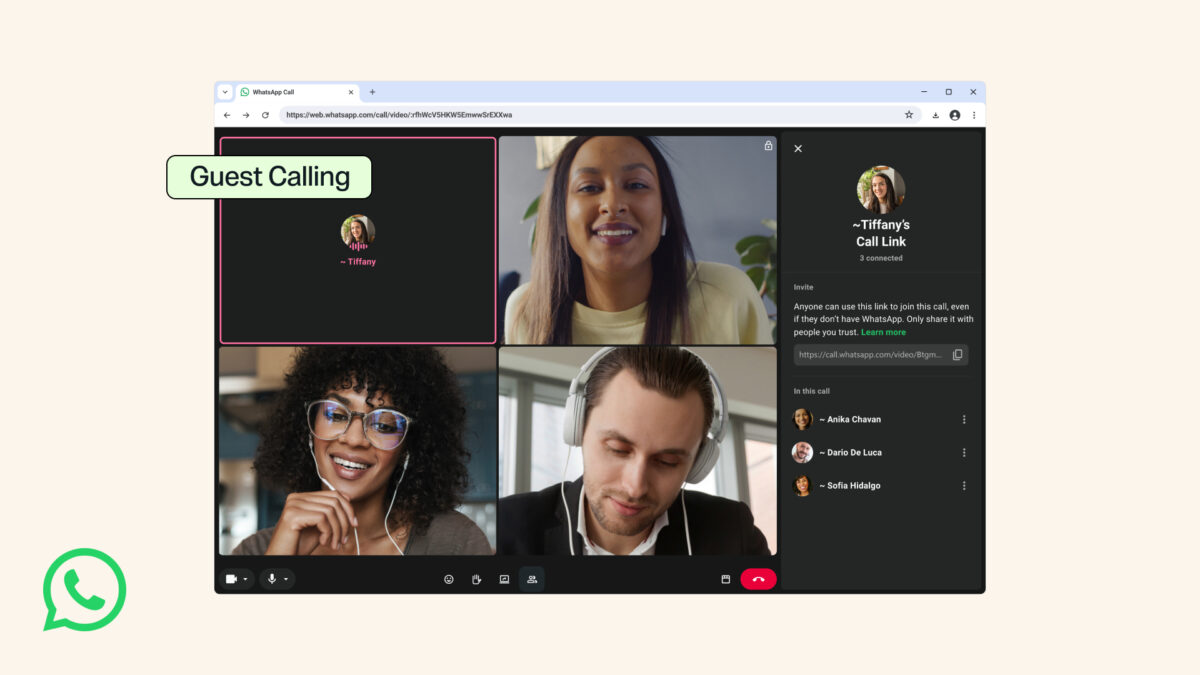
WhatsApp users can now invite people who don’t have a WhatsApp account into a WhatsApp call, after Meta announced guest calling on Wednesday, October 14, 2026. The guest opens a call link in a computer browser, types a name and waits for the host to let them in, with no app to install and no phone number to register.
For many Nigerians, that closes a gap that usually ends with someone downloading Zoom or Google Meet for a single meeting. A recruiter abroad, a client who only works from a laptop, a lecturer running a tutorial or an uncle who has never used WhatsApp can now join a call you start from your phone. Meta says these calls are free, end-to-end encrypted and have no time limit, and a call can hold up to 32 people once the host admits them.
| Announced | 14 October 2026 |
|---|---|
| Who can create a link | Only people with a WhatsApp account |
| How guests join | Call link opened in a computer browser |
| Call size | 1:1 and group calls of up to 32 people |
| Time limit | None, according to Meta |
| Encryption | End-to-end encrypted |
| Calendar plugins | Google Calendar and Outlook, later this year |
| Nigeria rollout date | Not confirmed |
Starting a call for someone without WhatsApp takes three taps
WhatsApp guest calling is built on the app’s existing call links, so the steps will feel familiar if you’ve shared one before. Open the Calls tab, tap the + icon, choose Create call link and send the link to the person by SMS, email or any other app they use. When they open it on a computer, they enter their name and land in a waiting room until you approve them from your phone.
Meta didn’t publish a country-by-country rollout schedule in its announcement, so the feature may not reach every account on the same day. If the option to create a call link looks the same and a guest can’t get past the browser page, update WhatsApp from Google Play or the App Store and try again later. Modified clients won’t receive it reliably, which is one more reason to stay off apps like those covered in our look at whether GBWhatsApp Pro is safe.
Guests get a seat in the call but not your phone number
The restrictions on guests are where this feature earns its keep for small businesses and anyone who doesn’t want strangers saving their number. Guests can’t see the phone numbers of other people on the call, can’t send messages and can’t add anyone else to it. What they can do is share their screen, raise a hand and react with a thumbs-up or a heart, which covers most of what a sales demo, a job interview or a project check-in needs.
The host stays in control throughout. Nobody joins until you approve them from the waiting room, and you can remove a guest at any point. Meta’s own summary of the feature describes it as “free, end-to-end encrypted calls for everyone with no time limits”, and the full details are in Meta’s announcement.
A waiting room only protects you if you check who’s in it
Because a guest chooses their own display name, the name you see in the waiting room is just text. Don’t admit someone you weren’t expecting, even if the name matches a colleague, and don’t post a call link in a public group or on social media when the conversation involves money, documents or personal details. If you’re the guest, only open links from people you already know, and be wary of anyone who sends a “WhatsApp call link” and then asks you to install an app, enter a bank PIN or share a one-time code, because a genuine guest call needs nothing beyond your name.
Long group calls also use a fair amount of data, particularly once someone starts sharing their screen. If you’ll be hosting from your phone on mobile data, our guide to finding out what’s eating your data on MTN, Airtel or Glo shows where to see how much WhatsApp has used, so a two-hour meeting doesn’t empty your bundle without warning.
Calendar invites are the next piece Meta has promised
Meta says WhatsApp plugins for Google Calendar and Outlook are coming later this year. Once you install the plugin and connect your WhatsApp account, you’ll be able to attach a WhatsApp call link to a calendar invite, and invitees will be able to join with or without an account. No date has been given, so for now the link still has to be shared by hand.
Guest calls are built for people who’ll never install WhatsApp, not a replacement for adding someone as a contact. If a person you call often keeps not showing up in your WhatsApp contacts, fixing that is still the better route. For the client in Abuja who lives in Outlook or the relative abroad who refuses to sign up, a call link sent today is enough to get them on the line.