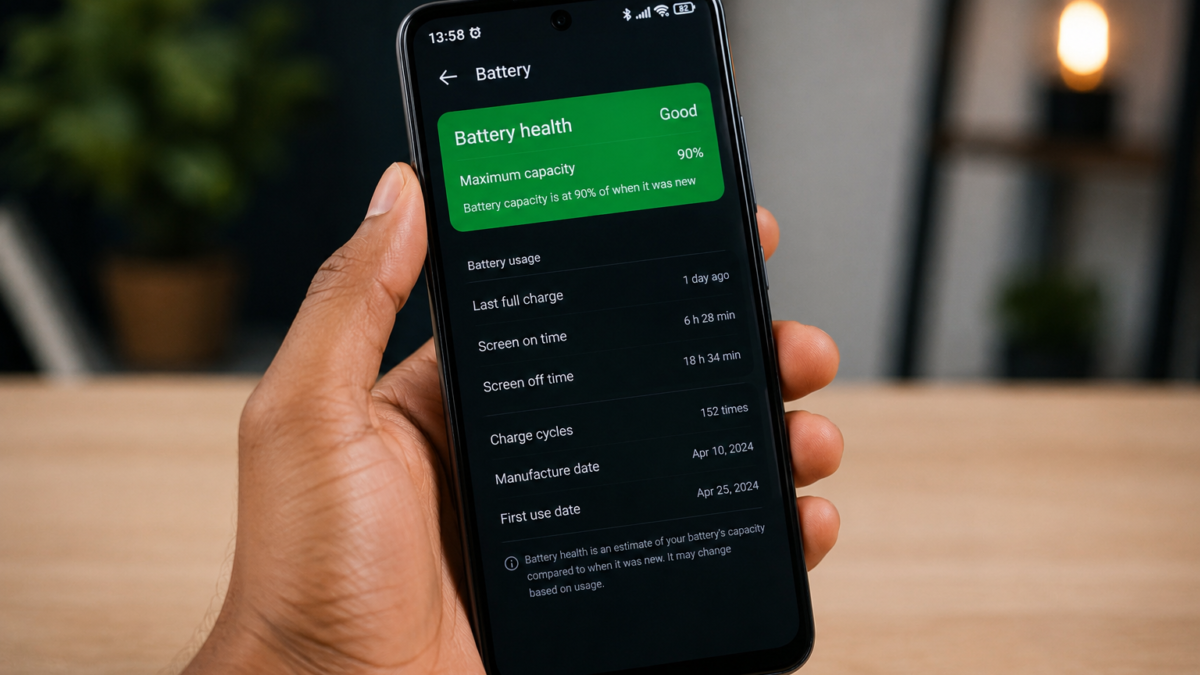
Android 14 introduced a battery information page showing your battery’s manufacture date and charge cycle count, and almost no Tecno, Infinix or itel sold in Nigeria actually has it. Google built the feature for Pixels, other manufacturers implement it when they feel like it, and Transsion largely hasn’t bothered. So the question of how worn your battery is, which matters enormously in a market where most phones change hands at least once, has no straightforward answer on the phones most Nigerians own.
What fills that gap is a great deal of confident nonsense. Search this question and you’ll be told to dial a code that returns a number, and the number will look official. It mostly isn’t measuring what you think it’s measuring. Here’s what each method actually tells you, which ones are worth your time, and how to check a battery before you buy someone’s used phone.
Why the dial code everyone recommends tells you almost nothing
The code in question is *#*#4636#*#*, typed into the dialler without pressing call, which opens a hidden testing menu on many Android phones. Under battery information you’ll see a Health field, and it will usually say Good.
That field is a status flag, not a measurement. Android reports Good, Overheat, Dead, Over voltage or Unknown, and those describe whether the battery is currently faulty rather than how much capacity it has lost. A three-year-old battery holding 62 percent of its original charge will still report Good, right up until it fails outright. It’s a fault indicator wearing the costume of a health reading, which is why so many people come away reassured by a phone that’s clearly struggling.
Newer Android versions have also restricted access to that menu on plenty of devices, so on some phones it simply won’t open. Codes you’ll see recommended for Samsung or Xiaomi are manufacturer-specific and won’t do anything on a Transsion phone. There is no working dial code that returns a real capacity percentage on Tecno, Infinix or itel, and any article telling you otherwise hasn’t tested it.
The one method that actually measures anything, and what it costs you
Battery health means current capacity compared to the capacity the cell had when new. Reading that directly requires access to system files most phones don’t expose, so the workable approach is measurement rather than lookup. AccuBattery from the Play Store does this by watching how much charge actually enters the battery during a charging session and comparing it against the design capacity the phone reports.
The trade-off is time. It needs several full charge sessions before the estimate settles, so install it, use the phone normally for a week or two, charge from low to full when you can, and then look at the health tab. Readings in the first few days will swing around and shouldn’t be trusted. What you’re after is the estimated capacity in mAh against the design capacity, and the gap between those two numbers is your wear.
Two things worth knowing before you rely on it. It’s modelling rather than reading, so treat it as a good approximation rather than a lab result. And it can only measure from the day you install it, which is precisely the limitation that makes it useless for the situation where you’d most want it.
So how do you check a used phone you’re about to buy?
You can’t, not properly, and pretending otherwise is where most guides fail Nigerian buyers. No app installed in a seller’s shop for five minutes will produce a meaningful capacity figure, and the ones that claim to are showing you the same Good flag or an invented number.
What you can do is test behaviour, which is slower to fake. Ask to see the phone at a charge level you can watch, then use it hard for ten minutes with the screen bright and a video playing. A worn battery gives itself away by dropping several percent in that window, by getting noticeably hot, or by jumping down in chunks rather than falling smoothly. Ask the seller to charge it in front of you too, because a battery that races from 20 to 60 percent and then crawls is showing you reduced capacity rather than fast charging.
The blunter signal is age. Batteries in daily use typically fall below 80 percent capacity somewhere in the region of a few hundred full charge cycles, which for most people arrives somewhere around the two-year mark. A phone from 2022 will have a tired battery regardless of what any app tells you, so price it accordingly and budget for a replacement. Our guide to the checks worth running before buying a refurbished flagship in Nigeria covers the rest of what to look at, and the steps for buying used phones online without getting scammed apply when you can’t hold the device first.
Check whether your phone has the page before you install anything
It costs nothing to look. Open Settings > About phone and see whether a battery information entry appears, which on devices that support it shows manufacture date and cycle count. Also try Settings > Battery and look for anything named battery health. Faster still, search “battery” in the Settings search bar, since that surfaces whatever your particular build includes without you hunting through menus.
- Search “battery” in Settings and check for a health or battery information page.
- If it exists, use it, because a manufacturer reading beats any estimate.
- If it doesn’t, install AccuBattery and give it two weeks.
- Ignore the dial codes and anything promising an instant percentage.
Run one battery app rather than three, because they interfere with each other’s measurements and you’ll end up with three numbers that disagree. Skip anything marketed as a battery doctor, optimiser or booster, since those do nothing for capacity and are generally there to serve you ads.
What the number changes once you have it
Less than you might hope, which is worth saying plainly. Capacity loss is chemical and permanent, so no calibration routine, full discharge ritual or app restores it. The advice about draining to zero and charging to full fixes the percentage display when it’s reading inaccurately, and does nothing whatsoever to the cell.
Below roughly 80 percent you’ll feel it in daily use, and that’s the point where a replacement starts making sense rather than a new phone, particularly given what phones cost now. Above that, your problem probably isn’t the battery at all, and software is the more likely culprit. If the phone was fine and then wasn’t, our piece on the three changes that actually speed up an older Android phone is a better starting point, and Transsion devices in particular ship with power settings most owners never touch, which our look at the hidden battery settings on the Infinix Zero Ultra goes through.
The honest summary is that Android still doesn’t give you what an iPhone gives you, and on Transsion phones it gives you less than most. Two weeks of measurement gets you a real answer, ten seconds of dialling a code gets you a word that means something else entirely, and knowing which is which puts you ahead of nearly everyone selling phones in an open market.